


lekuo

深圳市乐扩多媒体有限公司

lekuo
lekuo
lekuo
lekuo
lekuo
lekuo

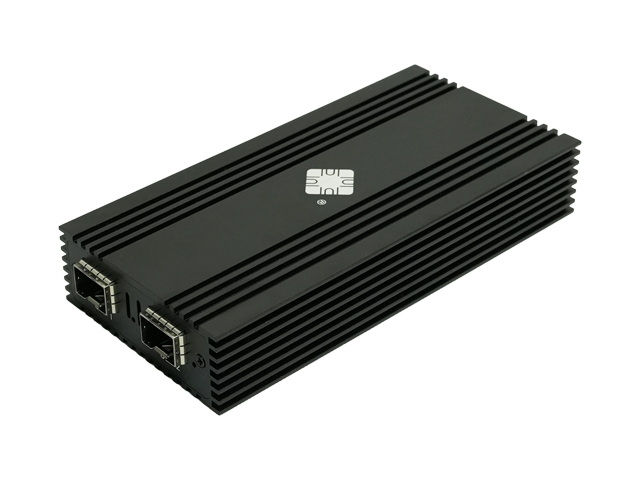
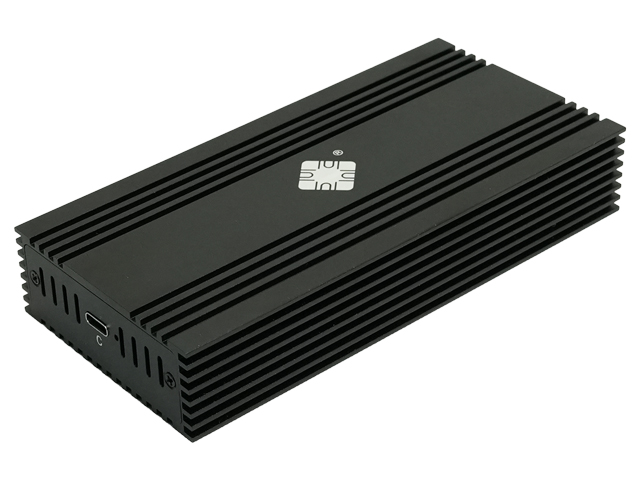
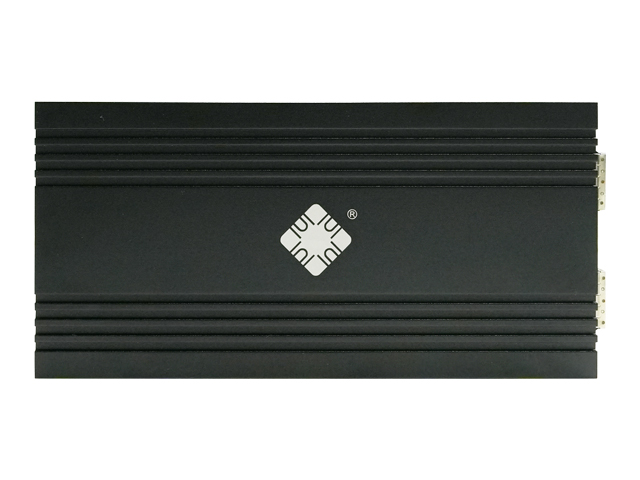
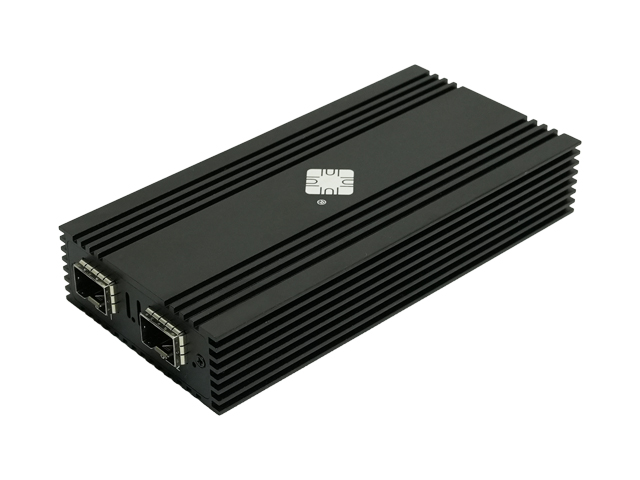
Lekuo Lekuo USB4 Dual SFP+ 10G Network Adapter | Intel 82599ES | Thunderbolt Compatible

• Intel 82599ES Chipset: Reliable performance and stability.

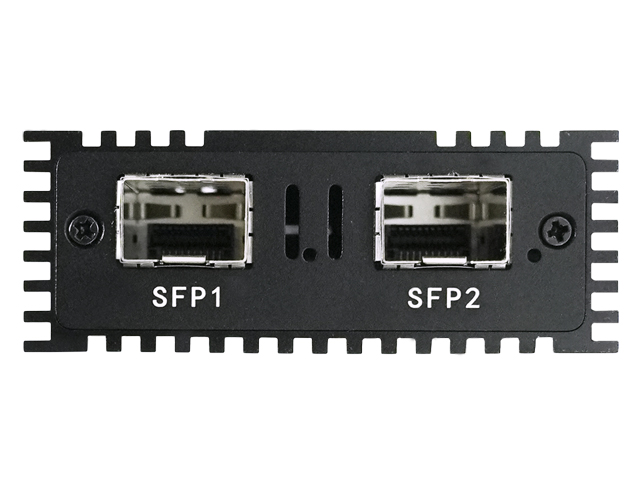
• Dual 10Gb SFP+ Ports: Connect to high-speed fiber networks with ease.

• Broad Compatibility:Works with Windows, Linux, and various server systems.
Model:
DTB3F21
Input Interface:
USB
Output Interface:
2 x SFP+
Motherboard Slot:
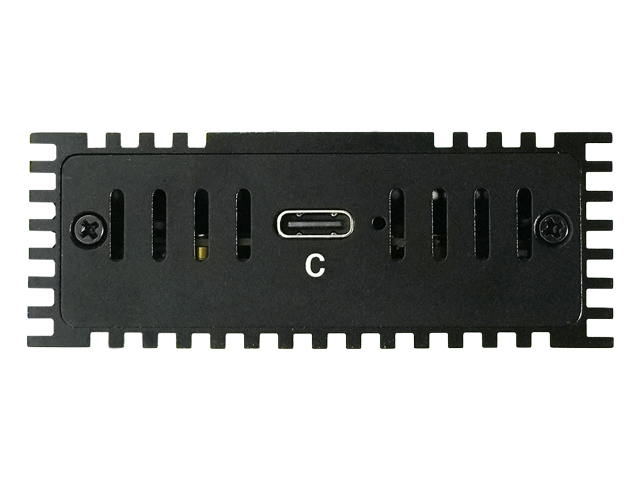
USB 4(Compatible with Thunderbolt 5/4/3)
Transmission Rate:
10Gbps
Product Size:
142.5x69.5x25.6mm
Chipset:
Intel 82599ES
Product Specifications
Product Description
Driver Download
Document Download
Q&A
Model
DTB3F21
Chipset
Intel 82599ES
Input
USB 4(Compatible with Thunderbolt 5/4/3)
Output
2 x SFP+
Transmission Rate
10Gbps
Product Size
142.5x69.5x25.6mm
Weight
N/W:239.5g ,G/W:335.5g
Usage Range
It is applicable to various 10G access network communications
Operating Temperature
0°C to 55C (32°F to 131F)
Storage Temperature
-40°℃ to 70°C (-40°F t0 158F)
System Compatibility
Mac OS,Windows,Linux,VMware UEFI,and other systems
Package Included
1 x USB4 to Dual 10Gb Fiber SFP+ Ports Network Adapter 1 x Type-C to Type-C Cable

Lekuo USB4 Dual-Port 10G SFP+ Fiber Network Adapter - Enterprise-Grade Solution

The Lekuo DTB3F21 is a professional dual-port 10 Gigabit fiber network adapter powered by the legendary Intel 82599ES chipset, delivering rock-solid 10Gbps connectivity for data centers, NAS systems, and high-performance workstations. With USB4/Thunderbolt compatibility, it brings enterprise-grade fiber networking to laptops and mini PCs.


Key Features:
• Intel 82599ES Chipset: Industry-proven reliability with 10+ years of enterprise deployment, supporting advanced features like SR-IOV virtualization and RDMA
• Dual 10Gb SFP+ Ports: Connect two independent 10G fiber networks or configure port bonding for 20Gbps aggregated bandwidth
• USB4/Thunderbolt Universal: Compatible with Thunderbolt 5/4/3 and USB4 devices - works with MacBook Pro, Mac Studio, Dell XPS, ThinkPad, and gaming laptops
• Plug-and-Play on macOS: No driver needed on macOS 11+ (Big Sur and newer) - just connect and go
• Professional Fiber Networking: Supports multimode (SR) and single-mode (LR) SFP+ transceivers for distances up to 10km/80km
• Low Latency & High Throughput: Hardware offloading for TCP/UDP checksums, TSO, RSS - ideal for iSCSI, NFS, and video production workflows


Perfect For:
• Mac Studio/MacBook Pro users needing 10G fiber connectivity for SAN/NAS storage
• Video Editing Workstations (4K/8K RED, ARRI workflows with fiber storage)
• Enterprise Data Centers (server-to-server interconnects, backup networks)
• Home Lab Virtualization (ESXi, Proxmox with SR-IOV for VM direct passthrough)
• Industrial Automation (deterministic low-latency control networks)
• Scientific Computing & HPC Clusters


Why Choose Lekuo DTB3F21?
Unlike consumer Realtek-based adapters, the Intel 82599ES is the gold standard for enterprise networking - the same chipset used in Dell/HP/Cisco servers. With dual ports, you can configure:
• Active-Passive Failover: Automatic redundancy if one link fails
• Link Aggregation (LACP): 20Gbps combined bandwidth for massive file transfers
• Separate Networks: Management network on Port 1, data network on Port 2

The compact aluminum enclosure provides excellent heat dissipation (fanless, silent operation), and the included USB4 cable ensures maximum compatibility with modern laptops.


Package Includes:
• 1 × Lekuo USB4 Dual SFP+ Network Adapter (DTB3F21)
• 1 × USB-C to USB-C Cable (USB4/Thunderbolt certified, 0.8m)
• 1 × User Manual with macOS/Windows/Linux setup guide


System Requirements:
• USB4 or Thunderbolt 5/4/3 port (NOT compatible with standard USB-C 3.2/3.1)
• For macOS: macOS 11 Big Sur or newer (no driver needed)
• For Windows: Windows 10/11 (64-bit) with Intel 82599 driver from support page
• For Linux: Kernel 3.10+ (ixgbe driver built-in for most distributions)
• SFP+ Transceivers: 10GBASE-SR (multimode, up to 300m) or 10GBASE-LR (single-mode, up to 10km) - transceivers sold separately


Technical Specifications:
• Chipset: Intel 82599ES (enterprise-grade, same as server NICs)
• Input: 1 × USB4/Thunderbolt port (40Gbps bandwidth)
• Output: 2 × SFP+ cages (10Gbps each)
• Supported Modes: 10GBASE-SR, 10GBASE-LR, 10GBASE-T (with compatible transceiver)
• Advanced Features: SR-IOV, VXLAN/NVGRE offload, IEEE 1588 PTP, Jumbo Frames (16KB)
• Power Consumption: 8W typical (USB bus-powered, no external adapter needed)
• Dimensions: 142.5 × 69.5 × 25.6mm (compact, portable)
• Operating Temp: 0°C to 55°C (32°F to 131°F)


Guaranteed Performance:
All Lekuo network adapters undergo 72-hour continuous stress testing and come with a 1-year warranty. The Intel 82599ES chipset has proven reliability in mission-critical environments worldwide. Perfect for professionals upgrading from 1GbE copper to 10GbE fiber or building distributed storage networks.


Common Use Cases:
• Mac Studio + DTB3F21 + Synology NAS (10G iSCSI for Final Cut Pro libraries)
• ThinkPad P1 + DTB3F21 + Enterprise SAN (40TB Avid MediaCentral workflow)
• Home Lab Server + DTB3F21 + TrueNAS (ZFS replication over dedicated 10G link)
• Industrial PC + DTB3F21 + Factory Automation (EtherCAT over fiber for noise immunity)


Note on SFP+ Transceivers:
This adapter does NOT include SFP+ optical modules. You need to purchase transceivers separately:
• For short distance (up to 300m): 10GBASE-SR multimode transceiver + OM3/OM4 fiber cable
• For long distance (up to 10km): 10GBASE-LR single-mode transceiver + OS2 fiber cable
• Recommended brands: Intel, Cisco, Finisar, or compatible third-party modules
 

1. DTB3F21 pdf
Q Is the Lekuo DTB3F21 adapter compatible with standard USB-C ports?
A Completely incompatible. This network adapter cannot function through standard USB-C (such as regular USB 3.2/3.1) ports. It must be connected to a Type-C port that supports USB4 or Thunderbolt 3/4/5 to provide the PCIe bandwidth required for full 10Gbps performance. Before purchasing, please verify that your device (e.g., recent MacBook Pro, Mac Studio, Dell XPS, ThinkPad X1, etc.) is equipped with a Thunderbolt or USB4 port.
Q Do I need to install drivers to use it on macOS or Windows?
A macOS: Completely driverless on macOS 11 and above! The native system kernel includes built-in support for the Intel 82599ES chipset. It is plug-and-play and will appear directly under Network in System Settings.
Windows / Linux / ESXi: Drivers are strictly required. It is recommended to download and install the official Intel 82599ES driver to ensure proper recognition and to fully utilize the performance of the network card. Although some Linux and Windows systems include built-in drivers, they are often outdated and may not allow the network card to reach its full performance.
Q Do I need to purchase SFP+ optical modules separately? Which brands are supported?
A Yes. The standard package only includes the adapter and a data cable. SFP+ modules and fiber cables must be purchased separately (unless you bought an official adapter + module bundle).
Short Range (within 300m): Choose 10GBASE-SR modules.
Long Range (within 10km): Choose 10GBASE-LR modules.
Brand Compatibility: Widely compatible with major standard SFP+ modules from brands like Intel, Cisco, Freescale, FS.com, and 10Gtek.
Q Can both SFP+ ports work simultaneously? What network modes are supported?
A Yes, both ports can be used at the same time. They can run independently (e.g., Port 1 for storage and Port 2 for management). Alternatively, you can configure Link Aggregation (LACP/802.3ad) in your OS or switch for up to 20Gbps of aggregate bandwidth, or set up Active-Passive Failover for network redundancy.
Q Can the DTB3F21 be connected to a traditional RJ45 (copper) 10G network?
A Yes. You will just need to purchase an additional 10GBASE-T SFP+ to RJ45 copper transceiver module (such as the Cisco SFP-10G-T-S or Intel E10GSFPT). Please note that 10G copper modules consume higher power (4–8W) and generate significant heat, so ensure proper ventilation during use.
Q Does it support SR-IOV technology in virtualization environments?
A Perfectly supported. The enterprise-grade Intel 82599ES chipset natively supports SR-IOV (Single Root I/O Virtualization), allowing up to 63–64 Virtual Functions (VFs) per physical port. This enables you to pass virtual network interfaces directly through to virtual machines in VMware ESXi 6.7+, Proxmox (PVE), or IOMMU-enabled Linux environments for near-native performance.
Q What is the difference between the DTB3F21 (Intel 82599) and cheaper Realtek network cards on the market?
A Intel 82599ES: An enterprise/data-center class chipset. It supports SR-IOV virtualization and features robust advanced hardware offload engines (e.g., 256KB TCP Segmentation, IPv6 Checksum Offload). It features extremely low CPU utilization and offers bulletproof stability and compatibility across Linux, ESXi virtualization, and data center platforms.
Realtek: belongs to consumer-grade products. It does not support SR-IOV virtualization, and network throughput heavily depends on host CPU overhead.
Q Does it support Jumbo Frames? How do I enable it?
A Yes, it supports Jumbo Frames up to 15.5KB–16KB. Enabling Jumbo Frames can reduce CPU overhead by 20–30% during large file transfers (like NAS storage, video editing, or data backups).
Windows: Device Manager → Network Adapter Properties → Advanced → Set "Jumbo Packet" to 9KB.
macOS: Open Terminal and enter sudo ifconfig enX mtu 9000 (replace enX with your actual network interface ID).
Linux: Run sudo ip link set ethX mtu 9000.
Q Does it consume a lot of power? Does it require an external power supply?
A No external power supply is needed. The adapter is fully bus-powered via the USB-C interface. Its typical power consumption under full load (both ports active) is around 8–12W. The power delivery capacity of the vast majority of Thunderbolt 3/4/5 or standard USB4 ports far exceeds this requirement, ensuring stable plug-and-play operation.
Q Why does my connection only show 1Gbps or frequently disconnect instead of hitting 10Gbps?
A Please troubleshoot by checking the following common causes in order:
1. Mismatched Fiber and Module: For example, plugging a single-mode fiber cable into an SR (multimode) module, or the fiber polarity is reversed (A-B tx/rx lines crossed).
2. Physical Link Loss: Check if the fiber connectors are dirty or contaminated, or if the fiber cable has sharp bends.
3. Peer Device Limitations: Verify if the connected switch, router, or NAS port actually supports and has 10G speeds enabled (ensure both ends are set to "Auto-Negotiation" or manually locked to 10G simultaneously).
4. Driver Issues: Check if the drivers under Windows/Linux/ESXi are correctly installed. On macOS 11+, you can verify the link status under System Information -> Network, where the link speed should display as "10 Gigabit".
Related Products
lekuo
USB4 to Dual 25G SFP28 Network Adapter
lekuo
USB4 to Dual 10G SFP+ Network Adapter,Realtek RTL8127ATF
lekuo
Lekuo USB4 to 10G SFP+ Network Adapter | Realtek RTL8127 | Ultra-Low 2.5W, Fanless
lekuo
Lekuo USB-C 10GbE Ethernet Adapter | Realtek RTL8159 | Up to 9.45Gbps
lekuo
Lekuo 6-in-1 USB4 Hub | 10G Ethernet, 3 USB Ports, SD/TF Card Reader
lekuo
Lekuo Lekuo USB4 Dual SFP+ 10G Network Adapter | Intel 82599ES | Thunderbolt Compatible